
Impersonation Attacks
Impersonation Attacks add internal phishing simulations where emails appear to come from trusted district roles (Leadership, Finance/HR, IT/Tech, or Employees). This helps you test social engineering risk across reporting lines, not just external threats.
How Impersonation Attacks Work
Impersonation Attacks send highly realistic phishing simulations that may appear to come from trusted people or departments inside your school or district.
How they work:
- Easy difficulty simulations: Impersonation attacks are not used.
- Medium difficulty simulations: Emails may use names from your school or district, but they are sent from a Tartan App training domain.
- High difficulty simulations: Emails will appear to come from your school or district domain.
These simulations can feel very real and may cause confusion, support tickets, or internal concern if staff have not been prepared.
We recommend enabling this only when
- Leadership, IT, and staff understand that these simulations may be used.
- You have a mature cybersecurity awareness training program.
- You have a positive culture around security training, and strong support from leadership and staff.
Video Walkthrough
Watch our step-by-step video guide to see the Impersonation Attacks setup process in action.
Availability
- The feature is off by default.
- Available only when Email Delivery Method is set to Google Workspace DMI (Recommended).
- If your delivery method is not DMI, the Impersonation Attacks option is disabled.
How to Enable It
- Go to Account settings.
- Set Email Delivery Method to Google Workspace DMI (Recommended).
- Click the toggle next to the header "Impersonation Attacks"
- Optionally add a school signature in the editor.
- Click Save.
School Signature
- The signature editor supports text, images, and links.
- You can likely copy and paste in your existing email signature.
- This signature is appended to impersonation emails.
- You can leave it blank.
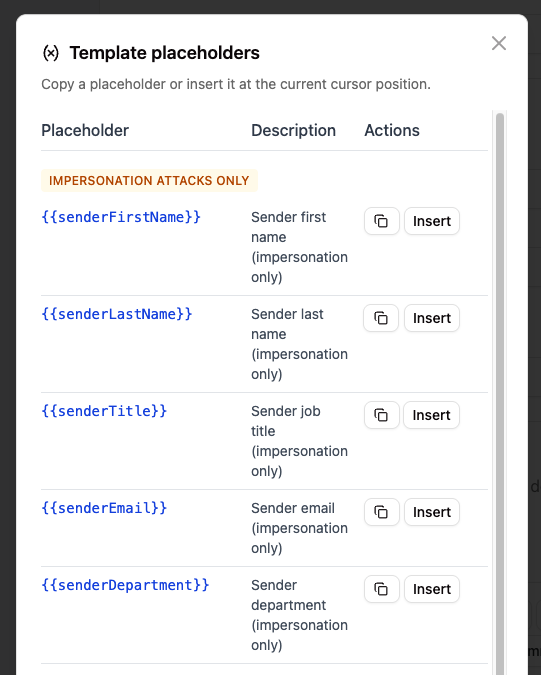
- You can also use placeholders to have the signature dynamically updated with the sender information.
Persona Mapping
Tartan maps existing Department values to standardized personas used by the impersonation scenarios:
- District Leadership
- Finance/HR
- IT/Tech
- Employees (staff only, no students)
Scenario Coverage (24 total)
Downward attacks (9)
| Appears to be from | Targets | Scenario themes |
|---|---|---|
| District Leadership | Employees | Policy Update, Staff Survey, SSN/SIN Request |
| Finance/HR | Employees | Tax Form Incomplete, Banking Correction, Address Confirmation |
| IT/Tech | Employees | Google Password Sync, Tech Handbook Review, Security Compliance |
Lateral attacks (6)
| Appears to be from | Targets | Scenario theme |
|---|---|---|
| IT/Tech | District Leadership | Hardware Upgrade |
| IT/Tech | Finance/HR | Invoice Inquiry |
| Finance/HR | IT/Tech | Software Audit |
| Finance/HR | District Leadership | Benefit Enrollment |
| District Leadership | Finance/HR | Urgent Wire Transfer |
| District Leadership | IT/Tech | Domain Renewal |
Upward attacks (9)
| Appears to be from | Targets | Scenario themes |
|---|---|---|
| Employees | District Leadership | Resource Proposal, Contract Article 14, Outreach Proposal |
| Employees | Finance/HR | Payroll Diversion, Life Event Update, Reimbursement |
| Employees | IT/Tech | Trouble Ticket, App Approval, Wi-Fi Help |
Email Style
- Impersonation emails are generated in a plain-text Gmail-like style.
- Content is minimal and usually includes a link-based call to action.
- School signature (if configured) is added at the bottom.
How Campaign Generation Works
When Impersonation Attacks are enabled, Tartan's AI generation engine draws from both:
- Standard Phishing Simulation templates
- Impersonation Attacks templates